
There is now a button on your post that lets anyone report it as “AI slop.”
What LinkedIn Changed
Hari Srinivasan, LinkedIn's Chief Product Officer for Ecosystem, laid out a package of updates in late July and opened by calling AI slop a top priority. His reasoning was simple... people come to LinkedIn to connect with real people and hear real perspectives. Six pieces of that announcement matter if you post for your business:
- 1The bot problem is larger than you think. LinkedIn is now catching hundreds of thousands of automated comment attempts every single day. In the last couple of months, it blocked billions of other automation attempts, including posting at scale. That is the volume of noise the platform is fighting behind the scenes, and it explains why the tone of this announcement was so direct.
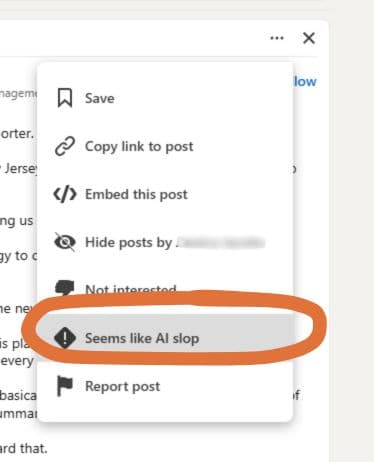
- 2A “Seems like AI slop” reporting option. Open the three-dot menu on any post or comment and you can flag it. Srinivasan was candid that slop is hard to define and that the definition keeps moving, so member reports give LinkedIn something to calibrate its models against.
- 3New classifiers that quietly reduce your reach. Improved systems now identify posts as AI slop or generally low quality, and that content appears less often in suggested posts and in content served from outside your network. That penalty hits the exact audience most professionals are trying to grow.
- 4A private flag in your own analytics. LinkedIn is testing a notice in your dashboard that tells you when members felt your post came off as inauthentic or heavy on AI. You will not see who reported it, but you will see that it happened.
- 5LinkedIn retired its own AI writing tool. The “enhance your post” feature, which rewrote your draft for you, is being removed. In its place is a proofreader that fixes your words without changing your voice.
- 6Expanded verification, and control over page comments. Profile and page verification keeps growing so members know who wrote what they are reading, and you can now block comments from Company pages you would rather not hear from.
The Distinction LinkedIn Made Very Clearly
Two lines from that announcement deserve more attention than they got:
The first is that AI and slop are not the same thing. Srinivasan said directly that plenty of people use AI to refine their thinking, and that those people probably want to know when they are coming across as inauthentic. The private dashboard flag exists to tell them, not to punish them. (Although - your post essentially gets shadow banned, so you are getting slightly punished)
The second explains the retired writing tool. LinkedIn asked why people run posts through AI in the first place, and the answer was confidence. LinkedIn is not a casual, one-word kind of place. People feel safer publishing something a machine has cleaned up than something they wrote themselves at 6 a.m.
Srinivasan also made a point of saying he wants members getting feedback from real humans on what sounds authentic, instead of an AI detector reviewing their work and getting it wrong. Which is worth sitting with, because it means the judgment being made about your writing is human judgment. There is no algorithm to appeal to.
What “AI Slop” Really Looks Like
Here is the part that surprises people. AI writing does not read as fake because the ideas are bad. It reads as fake because it reaches for the same small set of words and sentence shapes every single time. Once you know the shapes, you cannot unsee them, and neither can your audience.
There are 10 signs we watch for in every post we write and come across. These are the 3 your reader will catch first:
- 1Every sentence is the same length. This is the single biggest tell and the one readers notice without being able to name it. Four sentences in a row, all landing within a few words of each other, all medium, all even. Real people write a three-word sentence and then a forty-word one, because they are thinking while they type. A machine writes at one steady pace from the first line to the last, and the effect on the reader is a kind of low hum.
- 2Em dashes in place of ordinary punctuation. The em dash has become the most recognizable AI signature on the internet, and it is now the first thing people point to in the comments. AI reaches for it because it can hold two loosely related ideas together without committing to how they relate. A period or a comma almost always does the job, and it does not announce itself.
- 3Everything arrives in threes. X, Y, and Z. Then another set of three. One list of three in a post is fine and often useful. Four of them in a row is a machine that found a rhythm and kept going. Watch for the stacked triplet fragments too, the “Not this. Not that. It's this.” construction that shows up in nearly every AI-written leadership post.
Notice that none of the three require AI. A person can write all of them by hand, and plenty do. Which is the real point. Reporting is subjective, the definition will keep moving, and no detector can read your intent.
The other 7 are harder to spot in your own writing, because they feel like good writing while you are doing it. We put all of them in a one-page guide, along with the exact wording to keep each one out of your copy. Say goodbye to getting reported for AI slop!
How To Make Your AI Follow the Rules
The guide is written as instructions to the AI rather than tips for you, so it works word for word. You have two ways to use it:
- 1The quick way. Paste the page into ChatGPT, Claude, or whichever tool you write with at the start of a chat, before you ask for a post. It applies to everything you write in that conversation.
- 2The better way. Load it once and stop thinking about it. Both ChatGPT and Claude let you create a project, a saved workspace that carries the same background material into every chat inside it.
- Create a new project and name it something like “LinkedIn Posts.”
- Add the guide to the project's files or knowledge, and paste the text into the project instructions as well. Instructions carry the most weight, so it is worth having it in both places.
- While you are there, add anything else the tool should know about you: your role, who you serve, how you talk, and a few of your own posts that sounded like you.
- From then on, start every post inside that project. The rules apply before you type a word.
That second setup takes about 5 minutes and changes every draft you get afterward. It is also the closest thing to a fix for the problem LinkedIn is now flagging, because the tool stops producing the patterns in the first place instead of you catching them on the way out.
One Last Thing
You do not have to stop using AI. LinkedIn has said as plainly as a platform can that refining your thoughts and brainstorming with AI is fine, and retiring its own rewriter in favor of a proofreader proves the point. Use it to tighten a draft, catch a typo, or get unstuck on an opening line.
What the platform is now measuring is whether the result still sounds like a person. That part is on you, and it is mostly a matter of knowing what to strip out.

Carly
Social Media Manager at Bloom Social
Bloom Social is a boutique social media agency in Grand Rapids, Michigan, running executive LinkedIn and social media management for 50+ brands nationwide.